In the ever-evolving digital marketplace, finding the right tools to propel your business to new heights can seem daunting. Among these essential tools, Customer Relationship Management (CRM) software stands as a pivotal asset. But how do you navigate the sea of options to find the right CRM solution tailored to your business needs?
Embark on a journey of discovery with us as we delve into the world of CRM software, exploring its myriad functions and invaluable benefits. Our guide is designed to demystify the selection process, equipping you with the knowledge to make informed decisions that align perfectly with your business aspirations. Dive in and transform your customer interactions into seamless, meaningful engagements.
Understanding CRM Software

In the realm of digital transformation, Customer Relationship Management (CRM) software has emerged as an indispensable tool for businesses striving to optimize customer interactions and streamline processes. Whether you’re a small startup or a large corporation, understanding CRM software is key to unlocking new levels of efficiency and customer satisfaction.
At its core, CRM software is designed to manage a company’s interactions with current and potential customers. It uses data analysis about customers’ history with a company to improve business relationships, focusing specifically on customer retention and ultimately driving sales growth.
The Primary Functions and Benefits of CRM Software
CRM software provides a central repository for all customer-related data, making it easier for businesses to manage and analyze customer interactions. This leads to more efficient customer service, personalized marketing, and accurate sales forecasts. By automating repetitive tasks, CRM software allows your team to focus on building stronger customer relationships.
Some key benefits include increased efficiency in handling customer inquiries, enhanced communication through organized data, and improved customer satisfaction through personalized service.
Overview of Different Types of CRM Software
Not all CRM software is created equal. Different types cater to various business needs, ranging from operational, analytical, to collaborative CRM systems.
- Operational CRM: Focuses on streamlining customer interactions and automating sales, marketing, and service processes.
- Analytical CRM: Utilizes customer data analysis to improve decision-making processes, enhancing customer experience.
- Collaborative CRM: Facilitates communication and coordination between different departments to serve customers better.
Impact of CRM Software on Business Operations and Customer Relationships
The implementation of CRM software transforms business operations by providing a unified platform for tracking and managing customer interactions. This leads to more informed decision-making, allowing businesses to respond swiftly to customer needs. Moreover, CRM software fosters stronger customer relationships by providing insights that enable personalized communication and service.
“CRM software is not just a tool; it’s a strategy to strengthen your business and nurture customer loyalty.”
By integrating CRM software into your operations, you ensure a seamless and efficient experience for both your team and your customers, ultimately driving growth and success.
Identifying Business Needs

To select the perfect CRM software, it’s crucial to start with a clear understanding of your business needs. This ensures that the CRM you choose will enhance productivity, streamline processes, and ultimately drive growth.
Determining these needs involves a thorough analysis of your current business operations, challenges, and future goals. Only then can you match the CRM features with your objectives to ensure a seamless integration.
Methods to Evaluate Business Needs
Begin by conducting a comprehensive review of your existing processes. Engage with your team to gather insights on what currently works and where improvements are essential. Consider conducting surveys or workshops to collate diverse perspectives. This approach not only clarifies your needs but also encourages buy-in from future users.
Aligning CRM Features with Business Objectives
Once you have a clear picture of your business needs, align these with the available CRM features. For example, if customer support is your priority, look for CRMs with robust ticketing and communication features. If sales automation matters most, focus on CRMs with lead management and sales forecasting capabilities.
Consider the following alignment strategy:
- Map out your core objectives.
- Identify CRM features that directly support these goals.
- Evaluate how these features integrate with existing systems.
Critical Business Processes Supported by CRM
CRMs should support a range of critical business processes to ensure you’re leveraging its full potential. These typically include:
- Lead and contact management
- Sales pipeline tracking
- Marketing automation
- Customer service and support
- Reporting and analytics
By focusing on these processes, a CRM can transform how you interact with customers and drive meaningful improvements in customer satisfaction and business efficiency.
“Choosing the right CRM begins with understanding your needs; neglect this step, and risk chasing shadows.”
Key Features to Consider

Choosing the right CRM software can revolutionize your business operations, but knowing which features to prioritize is crucial. Here’s your guide to the essential CRM features that will empower your business growth.
A CRM system is not just about storing customer data; it’s about optimizing and streamlining business processes. Let’s delve into what makes a CRM indispensable for your organization.
Essential Features in CRM Software
When selecting CRM software, consider these key features that can hugely impact your business efficiency. Below is a detailed list to guide your decision-making process.
| Feature | Description |
|---|---|
| Contact Management | Efficiently stores customer information, communication history, and interaction details. |
| Sales Management | Tracks and manages sales pipelines, forecasts, and performance metrics. |
| Reporting & Analytics | Provides insights through reports and dashboards to help in decision-making. |
| Marketing Automation | Streamlines marketing campaigns and customer segmentation. |
| Customer Service | Enhances support with ticketing, support tracking, and service scheduling. |
Customization and Scalability
In today’s dynamic marketplace, customization and scalability are not just nice-to-haves but essential elements of any CRM software. A one-size-fits-all approach doesn’t cut it anymore.
Customization allows you to tailor the CRM system to align with your unique business processes and requirements. Whether it’s custom fields, workflows, or dashboards, the ability to personalize your CRM can significantly enhance user adoption and productivity.
Scalability ensures your CRM grows with your business. As your customer base expands, your CRM should seamlessly adapt, accommodating more users, data, and processes without compromising on performance. Investing in a scalable solution means investing in your company’s future success.
Integration Capabilities
An often overlooked yet crucial aspect of CRM software is its ability to integrate with existing business tools. Imagine the seamless synergy of your CRM with email platforms, accounting software, and lead generation tools.
Integration capabilities are essential for maintaining a unified view of your business processes and ensuring that data flows effortlessly between systems. This synergy not only boosts operational efficiency but also enhances data accuracy across all departments.
“The true power of CRM lies in its ability to harmonize with your existing digital ecosystem.”
Ensure your CRM software supports APIs and third-party integration to maximize its potential and truly transform your customer relationship management strategy.
Budgeting for CRM Software
Navigating the financial landscape of CRM software can be as pivotal as selecting the software itself. Understanding the associated costs ensures a smoother implementation and long-term success.
From initial purchase to ongoing maintenance, several factors contribute to the overall cost of CRM solutions. By breaking down these elements, businesses can plan effectively and avoid unexpected expenses.
Understanding Cost Factors
When budgeting for CRM software, consider both direct and indirect costs. Direct costs include the price of the software itself, while indirect costs may cover training, support, and integration with existing systems. Additionally, factor in potential upgrades and scalability as your business grows.
Pricing Models for Different Business Sizes
Choosing the right pricing model depends on your company’s size and needs. Here’s a comparison of common models:
| Pricing Model | Description | Best For |
|---|---|---|
| Subscription | Monthly or annual fees per user or feature set | Small to medium-sized businesses seeking flexibility |
| Perpetual License | One-time payment for indefinite use | Larger enterprises with sufficient up-front capital |
| Freemium | Basic features free with paid upgrades | Startups and small businesses with limited budgets |
Cost-Saving Strategies
Implementing CRM solutions can be costly, but there are ways to save:
- Opt for cloud-based solutions to reduce hardware costs.
- Leverage open-source CRM to minimize software expenses.
- Negotiate bulk licensing deals for larger teams.
- Utilize training resources provided by vendors instead of third-party trainers.
Smart budgeting not only saves money but also aligns your CRM investment with business objectives.
Evaluating Vendors and Solutions

In the bustling marketplace of CRM software, choosing the right vendor is akin to finding the perfect dance partner. It requires harmony, trust, and the ability to meet your business’s unique rhythm. But how do you sift through the multitude of options to find the perfect match?
Evaluating CRM vendors isn’t just about comparing features—it’s about understanding their strategic fit with your business objectives, culture, and long-term vision. It’s a crucial step that demands both diligence and discernment.
Criteria for Selecting CRM Vendors
When selecting CRM vendors, it’s essential to look beyond the marketing brochures. Start by verifying their industry expertise and track record. Are they familiar with the challenges and nuances of your sector? This knowledge can make a remarkable difference in the customization and implementation of the CRM.
Another vital factor is the scalability of their solutions. Your business might grow, and your CRM should grow with it without causing disruptions. Don’t forget to review the integration capabilities. A CRM that seamlessly integrates with your existing systems will save time and reduce headaches down the road.
Comparative Analysis of Potential Solutions
Performing a comparative analysis helps in making informed decisions. Start by listing the critical features your business needs, then compare them across multiple vendors. Here’s how you might structure your analysis:
| Feature | Vendor A | Vendor B | Vendor C |
|---|---|---|---|
| Customization Options | High | Medium | Low |
| Integration with Existing Systems | Yes | No | Yes |
| Scalability | Excellent | Good | Fair |
Importance of Customer Support and SLAs
Even the most robust CRM solution can falter without reliable customer support. Consider the availability of support services—are they 24/7, and how responsive are they to queries? Customer support can be the safety net that prevents minor issues from escalating into major disruptions.
Furthermore, meticulously examine the Service Level Agreements (SLAs). These are not just formalities but commitments that dictate the quality and reliability of the service. An SLA should clearly artikel the performance standards, response times, and remedies in case of breaches. As the adage goes,
“A chain is only as strong as its weakest link.”
Make sure your vendor’s support and SLAs are robust enough to withstand the demands of your business.
Implementation and Training

Embarking on the journey of CRM software implementation can feel like navigating uncharted waters. With a structured plan and the right guidance, the transition can be seamless and rewarding.
It’s crucial to recognize that successful CRM implementation involves more than just installing software—it’s about transforming how your team works and ensuring they have the tools and knowledge to thrive in this new environment.
Crafting a Step-by-Step Implementation Masterplan
To ensure your CRM rollout is smooth and impactful, consider a strategically designed plan that encompasses every stage of the process. Here’s a framework to guide you:
- Define Objectives: Clearly articulate what success looks like for your CRM implementation.
- Assemble a Project Team: Include cross-functional stakeholders to foster broad-based support.
- Data Migration Strategy: Plan how to effectively transition your data without losing critical information.
- Customizations and Integrations: Tailor the CRM to meet your unique needs and integrate it with existing systems.
- Trial Run: Conduct a pilot with a small user group to identify potential challenges.
- Go Live: Roll out the CRM company-wide, with support staff on hand to assist with any issues.
- Review and Optimize: Regularly assess the CRM’s performance and make necessary adjustments.
Empowering Users Through Comprehensive Training and Support
Training isn’t just a checkbox—it’s the lifeline to your CRM’s success. By investing in thorough and ongoing training programs, you can ensure your team is both proficient and enthusiastic about using the new system.
Key practices for effective training include:
- Tailored Training Sessions: Customize sessions to suit different roles and skill levels within your team.
- Hands-On Workshops: Engage users with practical, real-world scenarios they can relate to.
- Ongoing Support: Establish a helpdesk or a dedicated support team to handle queries promptly.
- Feedback Mechanism: Create channels for users to voice concerns and suggestions for improvement.
“The more efficiently users navigate the CRM, the greater the return on investment.”
Best Practices for Fostering User Adoption and Maximizing ROI
The best software in the world is worthless if no one uses it. To ensure your team embraces the CRM, focus on strategies that drive user adoption and, ultimately, boost your bottom line.
Foster a culture of adoption by:
- Communicating Benefits: Clearly articulate how the CRM will make users’ jobs easier and more effective.
- Incentivizing Use: Consider gamification or rewards for teams that excel in CRM utilization.
- Continuous Learning: Offer regular refresher courses to keep skills sharp and uncover advanced features.
- Sharing Success Stories: Highlight wins and improvements that result from effective CRM use.
By taking these steps, you’ll not only ensure a successful CRM implementation but also lay the groundwork for sustained success and improvement across your organization.
Summary
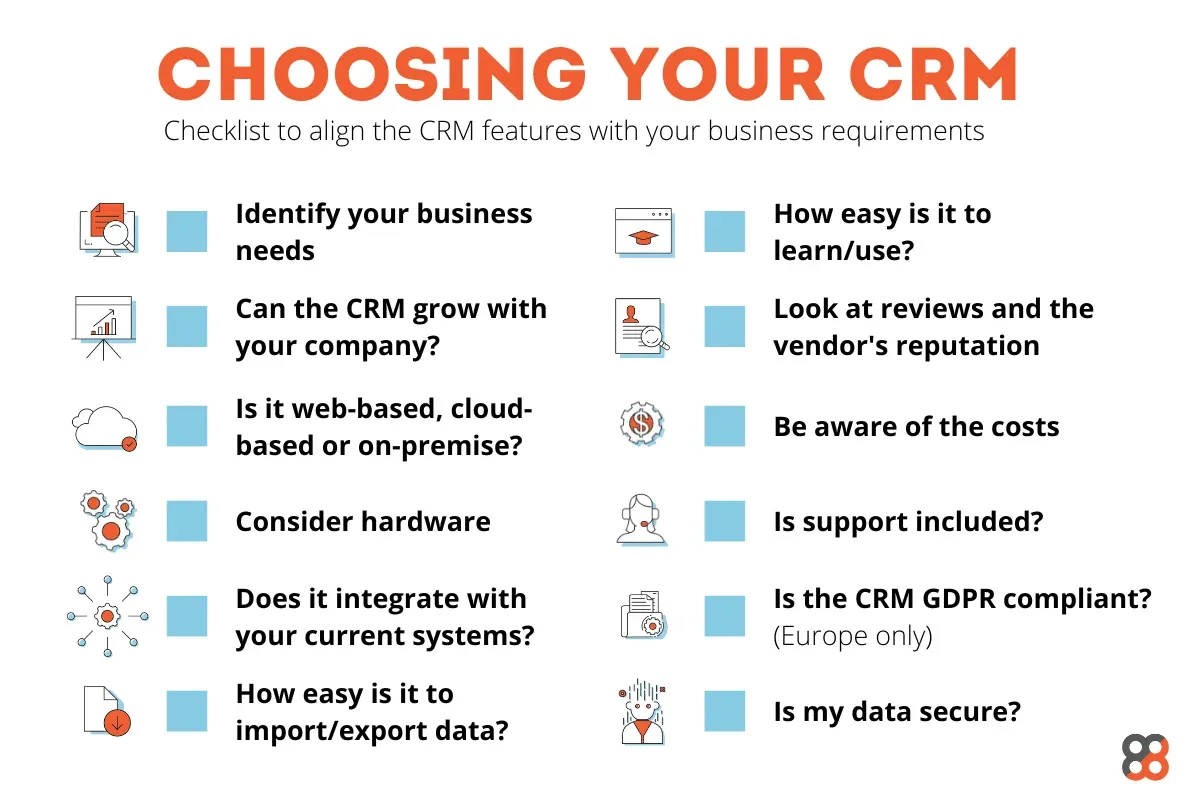
Choosing the right CRM software is not just about technology—it’s about paving the way for enhanced customer relationships and streamlined business processes. With the right choice, your business can unlock new levels of efficiency and customer satisfaction. Remember, the perfect CRM is one that grows with you, adapts to your needs, and supports your vision for success. Embrace this opportunity to revolutionize your customer management strategies and watch your business thrive.